Mini project
Data Science and Visualization, S2026

Introduction
Prediction problem
How athletic is a given person?
Some people have had their athleticism thoroughly measured, while others have not.
We analyse, through supervised learning, a large set of measured people (called athletes
), across a range of data points like age, height and distance from the measurement facility of the type of athletics (called Olympic Games
), to identify which parameters correlate best with a person’s athletics.
Ideas
We have considered a number of ideas for features.
Idea 1: Athletic performance as it relates to distance from home
Expectation: The further away the host country is from the country of origin the more disadvantaged the athlete will be.
Idea 2: Athletic performance as it relates to altitude
Expectation: Athletes from higher elevations will have an advantage in destinations with higher altitudes.
Idea 3: Athletic performance as it relates to home economy
Expectation: The lower the GDP per capita of the country of origin the lower your chance of success (i.e. an inverse correlation with GDP per capita).
Idea 4: Athletic performance as it relates to height of participant
Expectation: Taller athletes will perform better in disciplines that involve large distances (football, running, long jump, etc.), while shorter athletes will perform better in sports that require precise movement (figure skating, curling, etc.).
Source data
Wikidata from SPARQL endpoint
We use data from Wikidata about athletes and cities of the Olympic Games in the period 2010–2020.
Although the dataset spans a period of time, it is used as cross-sectional data; the time of events is used only to derive the age of the athlete at the time of the event.
The data is fetched from a SPARQL endpoint: either the official Wikidata or the faster QLever endpoints.
At the time of writing, the official endpoint is rate-limited and fails to resolve a second query altogether, making QLever the preferred option.
The SPARQL endpoint is accessed using the SPARQLWrapper library, extended locally to transform JSON-serialized results to Pandas dataframes.
Methods
In this section we discuss the methods we used in the project to gather and normalise the data in such a way that it could be analysed using linear and tree-based regression.
Data gathering
The first stage is data gathering, where we will use SPARQL queries to collect data from Wikidata. As the performance of the data source varies wildly depending on the time of day, our plan is to gather the data once and cache it for local use. This allows us to work on the data without pulling from the API every time we want to change something. We have decided to limit the data collection to the Olympic Games between 2010 and 2020 to avoid some irregularities with the countries in the older games and some missing data for the later games. The data from the queries is then inserted into a dataframe for use in later parts of the project.
Data cleaning
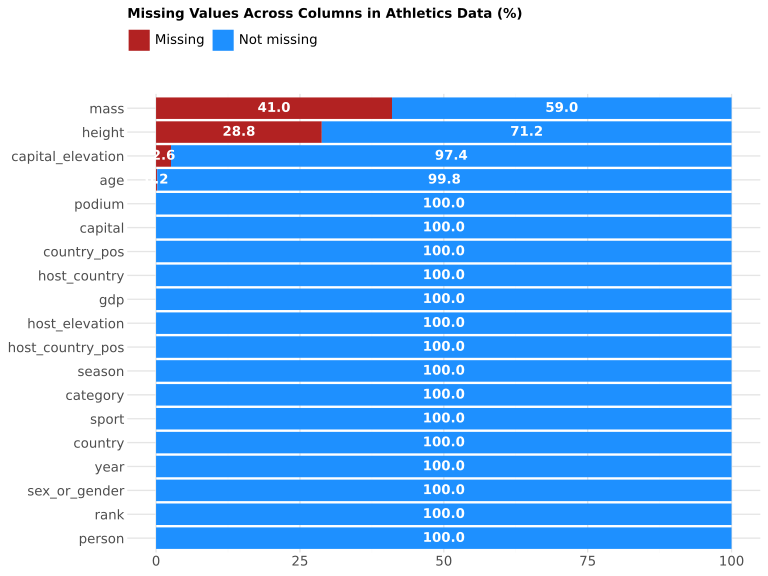
After setting up the dataframe with all the data we require, we will move on to the second stage: data cleaning and normalisation. This step is crucial, as the collected data contains some missing values for some attributes that, if left in, could cause our models to fit incorrectly. In preparation for this step we have also noticed a number of problems with the data which we could fix in the query.
Partitioning
The last step in what could be considered preparation is partitioning the data into smaller datasets for training, validation and testing. We do this to check that the derived model works on data that are not part of the training data. The data points are randomly assigned to either the training, validation or testing datasets, which roughly correlate to a 50-25-25 split between the different groupings.
Modelling
Once the data has been prepared, we will start utilising it by mapping some linear regression plots showing the relation between an athletes rank and the specific attributes. For clarity, we would like to inform the reader that we do not expect the answer to be as simple as the wealthier the country, the higher the rank
. If that, or any other single-attribute correlation, were indicative of Olympic performance, there would be no suspense regarding the outcome, and it would thus be a rather lacklustre spectator event. This is why we will also be conducting supervised data analysis in the form of linear and tree-based regression models.
Prepare system and source data
Prepare environment
Load external libraries
Most libraries are included as-is: the common packages pandas, matplotlib, plotnine and scikit-learn, as well as adding geopy, geopandas and shapely to compute distances between geopoints.
# Importing all relevant libraries

# Import the numpy library
import numpy as np

# Import the pandas library
import pandas as pd

# Import the Plotnine library
from plotnine import *

# Import the matplotlib library
import matplotlib.pyplot as plt

# Import the time library
import time

# Import IPython libraries for rendering math
from IPython.display import display, Math

# Import submodules from scikit-learn
from sklearn.linear_model import LinearRegression
from sklearn.neighbors import KNeighborsRegressor
from sklearn.preprocessing import StandardScaler
from sklearn.linear_model import LogisticRegression
from sklearn.metrics import roc_curve, roc_auc_score
from sklearn.preprocessing import PolynomialFeatures, StandardScaler
from sklearn.neighbors import KNeighborsClassifier

from sklearn.tree import DecisionTreeRegressor, plot_tree
from sklearn.ensemble import BaggingRegressor
from sklearn.ensemble import RandomForestRegressor
from sklearn.ensemble import GradientBoostingRegressor

from sklearn.tree import DecisionTreeClassifier, plot_tree
from sklearn.ensemble import BaggingClassifier, RandomForestClassifier
from sklearn.ensemble import GradientBoostingClassifier
from sklearn.metrics import roc_curve, roc_auc_score
from sklearn.model_selection import train_test_split, GridSearchCV
from sklearn.inspection import permutation_importance

# Import submodules for distance calculation
import geopy.distance, geopandas as gpd
from shapely.geometry import Point
Load vendored library
The library SPARQLWrapper, used to access web-based SPARQL API endpoints, has been custom-loaded in order to monkey-patch support for caching. Concretely, to avoid risking being banned from the service when we need to reload many times and, more generally, to act as polite netizens by not burdening public services unnecessarily.
# SPDX-FileCopyrightText: 2026 Jonas Smedegaard <dr@jones.dk
# SPDX-License-Identifier: GPL-3.0-or-later
import urllib.request
import urllib.error
import requests_cache

cache_session = requests_cache.CachedSession(
    'sparql2pandas',
    backend='sqlite',
    compression='gzip',
    allowable_methods=('POST'),
)

def cached_urlopen(request, timeout=None):
    response = cache_session.post(
        request.get_full_url(),
        data=request.data,
        headers=dict(request.header_items()),
        timeout=timeout or 30,
    )
    if response.status_code >= 400:
        raise urllib.error.URLError(f"HTTP {response.status_code}")
    return type('CachedResponse', (), {
        'read': lambda self: response.content,
        'geturl': lambda self: response.url,
        'info': lambda self: response.headers,
        '__enter__': lambda self: self,
        '__exit__': lambda *args: None,
    })()

urllib.request.urlopen = cached_urlopen

from SPARQLWrapper.SmartWrapper import SPARQLWrapper2, Bindings
import pandas as pd
import time

def _topandas(self) -> pd.DataFrame:
    """Convert SPARQL Bindings to DataFrame."""
    return pd.DataFrame(
        [[binding.get(var).value if binding.get(var) else None
          for var in self.variables]
         for binding in self.bindings],
        columns=self.variables)

Bindings.topandas = _topandas

def sparql2pandas(endpoint, rate_limit, query):
    time.sleep(rate_limit)
    sparql = SPARQLWrapper2(endpoint)
    sparql.agent = "SPARQL2Pandas"
    sparql.setMethod("POST")
    sparql.setQuery(query)
    return sparql.query().topandas()
Configure Notebook rendering
Configuration of pandas rendering has been tuned to limit table printouts, so as not to clutter this report too much with the many samples provided throughout.
Data gathering
Data from Wikidata is gathered by use of three queries to avoid reaching timeout on the public web service. Two queries are about Olympic data: one focusing on qualities tied to the participating athletes and one on qualities tied to the venue hosting the games. A third query fetches data about countries.
The queries about Olympic data were initially structured from different ends: athlete data started at persons with ties to sports and winning medals, where those medals were granted at an Olympic event; and game data started at the organisation, resolving the events they have organised. It turned out, however, that the person end was far too heavy on the public services available, and the final SPARQL queries presented here have been consolidated to both start by limiting scope to Olympic events and then divert in person or venue directions.
Events
First, data about OL games is collected.
events_query = """
PREFIX wd: <http://www.wikidata.org/entity/>
PREFIX wdt: <http://www.wikidata.org/prop/direct/>
PREFIX rdfs: <http://www.w3.org/2000/01/rdf-schema#>
PREFIX xsd: <http://www.w3.org/2001/XMLSchema#>
PREFIX p: <http://www.wikidata.org/prop/>
PREFIX psn: <http://www.wikidata.org/prop/statement/value-normalized/>
PREFIX wikibase: <http://wikiba.se/ontology#>

SELECT DISTINCT ?year ?season ?category
  ?host_country ?host_country_pos
#  (GROUP_CONCAT(DISTINCT ?place; SEPARATOR="; ") AS ?places)
  (MAX(?elevation) AS ?host_elevation)
#  ?games_id
WHERE {
  BIND("2010" AS ?games_since)
  BIND("2020" AS ?games_before)
  VALUES ?game_variant {
    wd:Q135976384   # Summer Olympic Games
    wd:Q137592217   # Winter Olympic Games
    wd:Q3327913     # Summer Paralympic Games
    wd:Q3317976     # Winter Paralympic Games
    wd:Q138029040   # Winter Youth Olympic Games
    wd:Q138028979   # Summer Youth Olympic Games
  }
  ?games_id wdt:P31 ?game_variant ;
            wdt:P580 ?launch .
  BIND(STR(YEAR(?launch)) AS ?year)
  FILTER(?year > ?games_since && ?year <= ?games_before)

  BIND(IF(?game_variant IN (wd:Q137592217, wd:Q3317976, wd:Q138029040),
    "winter", "summer") AS ?season)
  BIND(IF(?game_variant IN (wd:Q3327913, wd:Q3317976), "para",
    IF(?game_variant IN (wd:Q138029040, wd:Q138028979), "youth",
      "main")) AS ?category)

  OPTIONAL {
    ?games_id wdt:P17 ?host_country_id .
    ?host_country_id rdfs:label ?host_country .
    FILTER(LANG(?host_country) = "en")
    OPTIONAL {
      ?host_country_id wdt:P625 ?host_country_pos .
    }
  }

  OPTIONAL {
    VALUES ?place_property { wdt:P276 wdt:P131 } # geo or admin place
    ?games_id ?place_property ?place_id .
    OPTIONAL {
      ?place_id p:P2044/psn:P2044 [
          wikibase:quantityAmount ?elevation_amount ;
          wikibase:quantityUnit ?elevation_unit ] .
      BIND(
        IF(?elevation_unit = wd:Q11573, ?elevation_amount,         # m
        IF(?elevation_unit = wd:Q3710, ?elevation_amount * 0.3048, # foot
        IF(?elevation_unit = wd:Q828224, ?elevation_amount * 1000, # km
        ?elevation_amount))) AS ?elevation
      )
    }
  }
}
GROUP BY ?year ?season ?category ?host_country ?host_country_pos
  ?games_id
ORDER BY ?year ?season ?category

"""

events = sparql2pandas(sparql_endpoint, sparql_delay, events_query)
print(events)
year season category host_country host_country_pos host_elevation
0 2012 summer main United Kingdom POINT(-2.00000... 15.0
1 2012 summer para United Kingdom POINT(-2.00000... 15.0
.. ... ... ... ... ... ...
11 2018 winter para South Korea POINT(128.0000... 600.0
12 2020 winter youth Switzerland POINT(8.231973... 495.0
[13 rows x 6 columns]Participants
Then data about participants at OL games is collected.
athletes_query = """
PREFIX wd: <http://www.wikidata.org/entity/>
PREFIX wdt: <http://www.wikidata.org/prop/direct/>
PREFIX rdfs: <http://www.w3.org/2000/01/rdf-schema#>
PREFIX xsd: <http://www.w3.org/2001/XMLSchema#>
PREFIX p: <http://www.wikidata.org/prop/>
PREFIX ps: <http://www.wikidata.org/prop/statement/>
PREFIX psn: <http://www.wikidata.org/prop/statement/value-normalized/>
PREFIX pq: <http://www.wikidata.org/prop/qualifier/>
PREFIX wikibase: <http://wikiba.se/ontology#>

SELECT ?person ?rank ?age ?sex_or_gender ?height ?mass
  ?country ?year ?season ?category ?sport
#  ?person_id ?event_id
WHERE {
  BIND("2010" AS ?games_since)
  BIND("2020" AS ?games_before)
  VALUES ?game_variant {
    wd:Q135976384   # Summer Olympic Games
    wd:Q137592217   # Winter Olympic Games
    wd:Q3327913     # Summer Paralympic Games
    wd:Q3317976     # Winter Paralympic Games
    wd:Q138029040   # Winter Youth Olympic Games
    wd:Q138028979   # Summer Youth Olympic Games
  }
  ?games_id wdt:P31 ?game_variant ;
    wdt:P580 ?launch .
  BIND(STR(YEAR(?launch)) AS ?year)
  FILTER(?year > ?games_since && ?year <= ?games_before)

  BIND(IF(?game_variant IN (wd:Q137592217, wd:Q3317976, wd:Q138029040),
    "winter", "summer") AS ?season)
  BIND(IF(?game_variant IN (wd:Q3327913, wd:Q3317976), "para",
    IF(?game_variant IN (wd:Q138029040, wd:Q138028979), "youth",
      "main")) AS ?category)

  ?event_id wdt:P361+ ?games_id .

  # Event must be a sports competition
  ?event_id wdt:P641/rdfs:label ?sport .
  FILTER(LANG(?sport) = "en")

  ?event_id wdt:P31 ?event_type .
  ?event_type rdfs:label ?event_type_raw .
  FILTER(LANG(?event_type_raw) = "en")
  FILTER(
    CONTAINS(LCASE(?event_type_raw), "olympic") ||
    CONTAINS(LCASE(?event_type_raw), "paralympic")
  )
  FILTER(CONTAINS(LCASE(?event_type_raw), "event") ||
         CONTAINS(LCASE(?event_type_raw), "competition"))

  # Find persons with country, and with either rank or medal in events
  ?person_id wdt:P31 wd:Q5 ;
    wdt:P27 ?country_id ;
    p:P1344 ?participation .
  ?participation ps:P1344 ?event_id .

  # Must have either rank or medal
  OPTIONAL {
    ?participation pq:P1352 ?rank_raw .
  }
  OPTIONAL {
    ?participation pq:P166 ?medal_id .
    VALUES ?medal_id { wd:Q15243387 wd:Q15243388 wd:Q15243389 }
  }
  FILTER(BOUND(?rank_raw) || BOUND(?medal_id))

  BIND(
    IF(BOUND(?rank_raw), ?rank_raw,
      IF(?medal_id = wd:Q15243387, 1,
      IF(?medal_id = wd:Q15243388, 2,
      IF(?medal_id = wd:Q15243389, 3,
      ?rank_raw)))) AS ?rank
  )

  OPTIONAL {
    ?person_id wdt:P569 ?birth_raw .
  }
  BIND(
    IF(BOUND(?birth_raw),
      YEAR(?launch) - YEAR(?birth_raw) -
        IF(MONTH(?launch) < MONTH(?birth_raw) ||
          (MONTH(?launch) = MONTH(?birth_raw) &&
            DAY(?launch) < DAY(?birth_raw)),
        1, 0),
      ?birth_raw) AS ?age
  )

  OPTIONAL {
    ?person_id wdt:P21 ?sex_or_gender_id .
    ?sex_or_gender_id rdfs:label ?sex_or_gender .
    FILTER(LANG(?sex_or_gender) = "en")
  }

  OPTIONAL {
    ?person_id p:P2048/psn:P2048 [
        wikibase:quantityAmount ?height_amount ;
        wikibase:quantityUnit ?height_unit ] .
    BIND(
      IF(?height_unit = wd:Q11573, ?height_amount,           # meter
      IF(?height_unit = wd:Q174728, ?height_amount * 0.01,   # centimeter
      IF(?height_unit = wd:Q218593, ?height_amount * 0.0254, # inch
      IF(?height_unit = wd:Q3710, ?height_amount * 0.3048,   # foot
      ?height_amount * -1)))) AS ?height                     # ambiguous
    )
  }

  OPTIONAL {
    ?person_id p:P2067/psn:P2067 [
        wikibase:quantityAmount ?mass_amount ;
        wikibase:quantityUnit ?mass_unit ] .
    BIND(
      IF(?mass_unit = wd:Q11570, ?mass_amount,               # kilogram
      IF(?mass_unit = wd:Q41803, ?mass_amount * 0.001,       # gram
      IF(?mass_unit = wd:Q100995, ?mass_amount * 0.45359237, # pound
      ?mass_amount * -1))) AS ?mass                          # ambiguous
    )
  }

  # find newest citizenship
  {
    SELECT ?person_id (SAMPLE(?c_id) AS ?country_id)
    WHERE {
      {
        SELECT ?person_id ?c_id (MAX(?c_start) AS ?max_start)
        WHERE {
          ?person_id p:P27 ?citizenship .
          ?citizenship ps:P27 ?c_id .
          OPTIONAL { ?citizenship pq:P580 ?c_start . }
        }
        GROUP BY ?person_id ?c_id
      }
      BIND(COALESCE(?max_start, "0001-01-01"^^xsd:dateTime)
        AS ?sort_date)
    }
    GROUP BY ?person_id
    ORDER BY DESC(?sort_date)
  }

  ?country_id rdfs:label ?country .
  FILTER(LANG(?country) = "en")

  ?person_id rdfs:label ?person .
  FILTER (LANG(?person) = "en")

# TODO: resolve citizenship at the time of event (not simply newest)
# FIXME: avoid double-counting athletes with multiple participations
}
ORDER BY ?year ?season ?category ?sport ?person

"""

athletes = sparql2pandas(sparql_endpoint, sparql_delay, athletes_query)
print(athletes)
person rank age sex_or_gender height ... country year \
0 Aída Román 7.0 24 female 1.68 ... Mexico 2012
1 Aída Román 2.0 24 female 1.68 ... Mexico 2012
... ... ... .. ... ... ... ... ...
11165 Valeriya Sorok... 14.0 16 female NaN ... Russia 2020
11166 Yukino Yoshida 3.0 16 female NaN ... Japan 2020
season category sport
0 summer main archery
1 summer main archery
... ... ... ...
11165 winter youth speed skating
11166 winter youth speed skating
[11167 rows x 11 columns]Countries
Finally, data about countries is collected.
country_query = """
prefix wd: <http://www.wikidata.org/entity/>
prefix wdt: <http://www.wikidata.org/prop/direct/>
prefix rdfs: <http://www.w3.org/2000/01/rdf-schema#>
prefix p: <http://www.wikidata.org/prop/>
prefix ps: <http://www.wikidata.org/prop/statement/>
prefix pq: <http://www.wikidata.org/prop/qualifier/>

select ?country ?gdp ?country_pos ?capital ?capital_elevation
# ?country_id
where {
  ?country_id wdt:P31 wd:Q6256 .  # sovereign state

  ?country_id p:P2131 [
    ps:P2131 ?gdp ;
    pq:P585 ?gdp_time ;
  ] ;
    rdfs:label ?country .
  filter(lang(?country) = "en")

  optional {
    ?country_id wdt:P625 ?country_pos .
  }
  optional {
    ?country_id wdt:P36 ?capital_id .
    ?capital_id rdfs:label ?capital .
    filter(lang(?capital) = "en")
  }
  optional {
    ?capital_id wdt:P2044 ?capital_elevation .
  }

  # subquery to find newest GDP
  {
    select ?country_id (max(?year) as ?max_year)
    where {
      ?country_id wdt:P31 wd:Q6256 ;
        p:P2131 [
          ps:P2131 ?val ;
          pq:P585 ?pt ;
        ] .
      bind(year(?pt) as ?year)
    }
    group by ?country_id
  }
  filter(year(?gdp_time) = ?max_year)
}
order by ?country

"""

country = sparql2pandas(sparql_endpoint, sparql_delay, country_query)
print(country)
country gdp country_pos capital capital_elevation
0 Afghanistan 17233051620.0 POINT(66.00000... Kabul 1790.0
1 Albania 23547179830.0 POINT(20.00000... Tirana 110.0
.. ... ... ... ... ...
203 Zimbabwe 20678055598.0 POINT(30.00000... Harare 1494.0
204 Zimbabwe 20678055598.0 POINT(30.00000... Harare 1492.0
[205 rows x 5 columns]Data cleaning
                  person  rank age sex_or_gender height  ... host_elevation  \
0             Aída Román   7.0  24        female   1.68  ...           15.0
1             Aída Román   2.0  24        female   1.68  ...           15.0
...                  ...   ...  ..           ...    ...  ...            ...
11240  Valeriya Sorok...  14.0  16        female    NaN  ...          495.0
11241     Yukino Yoshida   3.0  16        female    NaN  ...          495.0

                   gdp        country_pos      capital capital_elevation
0      1414187193992.0  POINT(-102.000...  Mexico City            2240.0
1      1414187193992.0  POINT(-102.000...  Mexico City            2240.0
...                ...                ...          ...               ...
11240  2240422438363.0  POINT(94.25000...       Moscow             156.0
11241  4231141201863.0  POINT(136.0000...        Tokyo               6.0

[11242 rows x 18 columns]
Numeric values
Numeric fields are typecast as such.
                  person  rank age sex_or_gender height  ... host_elevation  \
0             Aída Román     7  24        female   1.68  ...         15.000
1             Aída Román     2  24        female   1.68  ...         15.000
...                  ...   ...  ..           ...    ...  ...            ...
11240  Valeriya Sorok...    14  16        female    NaN  ...        495.000
11241     Yukino Yoshida     3  16        female    NaN  ...        495.000

                   gdp        country_pos      capital capital_elevation
0      1414187193992.0  POINT(-102.000...  Mexico City            2.240k
1      1414187193992.0  POINT(-102.000...  Mexico City            2.240k
...                ...                ...          ...               ...
11240  2240422438363.0  POINT(94.25000...       Moscow           156.000
11241  4231141201863.0  POINT(136.0000...        Tokyo             6.000

[11242 rows x 18 columns]
Rank and on podium
Rank is simplified as on podium or not – i.e. a top-three ranking.
                  person  rank age sex_or_gender height  ...              gdp  \
0             Aída Román     7  24        female   1.68  ...  1414187193992.0
1             Aída Román     2  24        female   1.68  ...  1414187193992.0
...                  ...   ...  ..           ...    ...  ...              ...
11240  Valeriya Sorok...    14  16        female    NaN  ...  2240422438363.0
11241     Yukino Yoshida     3  16        female    NaN  ...  4231141201863.0

             country_pos      capital capital_elevation         podium
0      POINT(-102.000...  Mexico City            2.240k  Not on podium
1      POINT(-102.000...  Mexico City            2.240k      On podium
...                  ...          ...               ...            ...
11240  POINT(94.25000...       Moscow           156.000  Not on podium
11241  POINT(136.0000...        Tokyo             6.000      On podium

[11242 rows x 19 columns]
Checking for and deleting NA values
# Specify a global theme to use in all plots
title_left = element_text(face = "bold", size = 10, ha = "left")
title_center = element_text(face = "bold", size = 10, ha = "center")
global_theme = (
    theme_minimal() +
    theme(
        title = title_left,
        axis_text = element_text(size = 10),
        axis_title = title_center,
        legend_position = "top",
        legend_direction = "horizontal",
        legend_justification = "left",
        legend_text = element_text(size = 10),
        legend_title = title_center,
        legend_title_position = "bottom",
        figure_size = (8, 6)
    )
)
# Construct a DataFrame containing the data to be plotted
# Compute percentages of missing and non-missing values on each column
# Collect the values in a new DataFrame
df_nan_plot = pd.DataFrame(
{
"col": df.columns,
"Missing": round(df.isna().sum() / df.shape[0] * 100, 1),
"Not missing": round(df.notna().sum() / df.shape[0] * 100, 1)
}
)
# Reshape the data to long format
df_nan_plot = df_nan_plot.melt(
id_vars = "col",
value_vars = ["Missing", "Not missing"],
var_name = "nan_obs",
value_name = "pct"
)# Reorder categorical variables and replace 0 with none
# Reorder column names after percentage of nan values
df_nan_plot["col"] = pd.Categorical(
df_nan_plot.loc[:, "col"],
categories = (df_nan_plot
.loc[df_nan_plot.loc[:, "nan_obs"] == "Missing", :]
.sort_values("pct")
.loc[:, "col"]
.tolist()
),
ordered = True
)
# Reorder grouping column to make nan appear first in plot
df_nan_plot["nan_obs"] = pd.Categorical(
df_nan_plot.loc[:, "nan_obs"],
categories = ["Not missing", "Missing"],
ordered = True
)
# Remove rows with percentage value 0
df_nan_plot = df_nan_plot.loc[df_nan_plot.loc[:, "pct"] > 0, :]# Step 3: Create the plot
nan_plot = (
# Specify data and mapping
ggplot(
data = df_nan_plot,
mapping = aes(x = "col", y = "pct", fill = "nan_obs")
) +
# Select the geom for stacked bar plots
geom_col() +
# Assign labels to slices with geom_text()
geom_text(
mapping = aes(label = "pct"),
position = position_stack(vjust = 0.5),
size = 10,
fontweight = "bold",
color = "white"
) +
# Display column names on the y axis
coord_flip() +
# Control colors use to represent categories
scale_fill_manual(
values = {
"Not missing": "dodgerblue",
"Missing": "firebrick"
}
) +
# Edit axis labels and title
labs(
x = "",
y = "",
fill = "",
title = "Missing Values Across Columns in Athletics Data (%)"
) +
# Use the global theme
global_theme +
# Reverse the order of the legend
guides(fill = guide_legend(reverse = True))
)
                person  rank age sex_or_gender height  ...              gdp  \
0           Aída Román     7  24        female   1.68  ...  1414187193992.0
1           Aída Román     2  24        female   1.68  ...  1414187193992.0
...                ...   ...  ..           ...    ...  ...              ...
7801  Valentin Foubert    10  17          male   1.65  ...  2782905325625.0
7802        Yuna Kasai     6  15        female   1.65  ...  4231141201863.0

            country_pos      capital capital_elevation         podium
0     POINT(-102.000...  Mexico City            2.240k  Not on podium
1     POINT(-102.000...  Mexico City            2.240k      On podium
...                 ...          ...               ...            ...
7801  POINT(2.000000...        Paris            48.000  Not on podium
7802  POINT(136.0000...        Tokyo             6.000  Not on podium

[7803 rows x 18 columns]
Calculating distances
We use the geopy library to calculate the distances between athlete’s home and the place of olympic games. Originally the data is stored as strings in the form of POINT(X,Y)
where we need them to be tuples of the pandas Point type. The following cells do just that.
# Change the string "POINT(X,Y) into a tuple of strings ["X", "Y"]

point_to_list = lambda x: x[6:-1].split()

df["country_pos_num"] = (
    df.loc[:, "country_pos"]
    .astype("string")
    .map(point_to_list)
)
df["host_country_pos_num"] = (
    df.loc[:, "host_country_pos"]
    .astype("string")
    .map(point_to_list)
) country_pos_num host_country_pos_num
0 [-102.000000, ... [-2.000000, 54...
1 [-102.000000, ... [-2.000000, 54...
... ... ...
7801 [2.000000, 47.... [8.231973, 46....
7802 [136.000000, 3... [8.231973, 46....
[7803 rows x 2 columns]# Turn the tuple of strings ["X", "Y"] into a tuple of floats [X, Y]
final = lambda x: list(map(float, x))
df["country_pos_num"] = df.loc[:, "country_pos_num"].map(final)
df["host_country_pos_num"] = (
df.loc[:, "host_country_pos_num"]
.map(final)
)
print(df.loc[:,["country_pos_num", "host_country_pos_num"]]) country_pos_num host_country_pos_num
0 [-102.0, 23.0] [-2.0, 54.6]
1 [-102.0, 23.0] [-2.0, 54.6]
... ... ...
7801 [2.0, 47.0] [8.231973, 46....
7802 [136.0, 35.0] [8.231973, 46....
[7803 rows x 2 columns] person rank age sex_or_gender height ... capital \
0 Aída Román 7 24 female 1.68 ... Mexico City
1 Aída Román 2 24 female 1.68 ... Mexico City
... ... ... .. ... ... ... ...
7801 Valentin Foubert 10 17 male 1.65 ... Paris
7802 Yuna Kasai 6 15 female 1.65 ... Tokyo
capital_elevation podium country_position host_country_position
0 2.240k Not on podium POINT (-102 23) POINT (-2 54.6)
1 2.240k On podium POINT (-102 23) POINT (-2 54.6)
... ... ... ... ...
7801 48.000 Not on podium POINT (2 47) POINT (8.23197...
7802 6.000 Not on podium POINT (136 35) POINT (8.23197...
[7803 rows x 18 columns]# Calculate the distances between home city and olympic city based on geometric points
def coordinate_distance_calculator(
input_coordinate_list=df.loc[:, "country_position"],
target_coordinate_list=df.loc[:, "host_country_position"]
):
calculated_distance_df = []
for i in range(len(input_coordinate_list)):
input_coordinate = input_coordinate_list[i]
target_coordinate = target_coordinate_list[i]
coordinates_df = gpd.GeoDataFrame(
{'geometry': [target_coordinate, input_coordinate]},
crs='EPSG:4326',
)
coordinates_df = coordinates_df.to_crs('EPSG:5234')
distance = coordinates_df.geometry.iloc[0].distance(
coordinates_df.geometry.iloc[1])
calculated_distance_df.append(distance)
return calculated_distance_df
df['calculated_distance'] = coordinate_distance_calculator()
print(df) person rank age sex_or_gender height ... capital_elevation \
0 Aída Román 7 24 female 1.68 ... 2.240k
1 Aída Román 2 24 female 1.68 ... 2.240k
... ... ... .. ... ... ... ...
7801 Valentin Foubert 10 17 male 1.65 ... 48.000
7802 Yuna Kasai 6 15 female 1.65 ... 6.000
podium country_position host_country_position calculated_distance
0 Not on podium POINT (-102 23) POINT (-2 54.6) 9.182M
1 On podium POINT (-102 23) POINT (-2 54.6) 9.182M
... ... ... ... ...
7801 Not on podium POINT (2 47) POINT (8.23197... 632.847k
7802 Not on podium POINT (136 35) POINT (8.23197... 10.523M
[7803 rows x 19 columns]Create indicator (a.k.a. dummy) variables
We create dummy variables for the cathegorical variables, such as country, sport (discipline) and sex/gender of the athlete.
                person  rank age height  year  ... Sport: wrestling  \
0           Aída Román     7  24   1.68  2012  ...            False
1           Aída Román     2  24   1.68  2012  ...            False
...                ...   ...  ..    ...   ...  ...              ...
7801  Valentin Foubert    10  17   1.65  2020  ...            False
7802        Yuna Kasai     6  15   1.65  2020  ...            False

     Sport: épée fencing Gender: intersex woman  Gender: male  \
0                 False               False             False
1                 False               False             False
...                 ...                 ...               ...
7801              False               False              True
7802              False               False             False

     Gender: non-binary
0                 False
1                 False
...                 ...
7801              False
7802              False

[7803 rows x 231 columns]
Modelling
We have prepared 4 models to see which might best predict the results of olympics. The first two predict the rank of the athlete using simple linear regression or a tree-based regression. The second two focus on the prediction if the athlete will end on the podium or not, using simple classification or a tree-based classification.
Linear regression
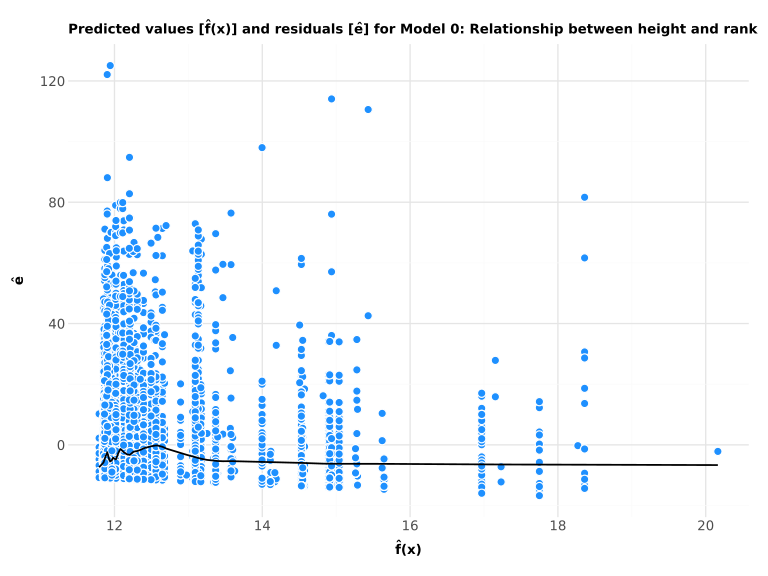
Test: Multiple linear regression model only for height
Linear regression is computed for just one input as a check of working code.
      capital_elevation
0                2.240k
1                2.240k
...                 ...
7801             48.000
7802              6.000

[7803 rows x 1 columns]
0        7
1        2
        ..
7801    10
7802     6
Name: rank, Length: 7803, dtype: int64 Term Estimate
0 Intercept 11.856
1 Elevation 2.300m# Compute goodness of fit metrics
# Define a function to compute the RMSE and the R^2
def regression_gof(model, X, Y):
# Compute the predicted values
Y_hat = model.predict(X)
# Compute the residuals
e_hat = Y - Y_hat
# Compute the RSS
RSS = sum(e_hat ** 2)
# Compute the RMSE
RMSE = (RSS / X.shape[0]) ** (1/2)
# Compute the mean percentage deviation from the regression line
DEV = RMSE / Y.mean() * 100
# Compute R^2
R2 = Y.corr(pd.Series(Y_hat)) ** 2
# Return the RMSE and R^2
return (round(RMSE, 2), round(DEV, 2), round(R2, 3), Y_hat, e_hat)
# Compute and print the RMSE and the R^2
rmse, pct, r2, _, _ = regression_gof(mlr_1, X, Y)
print(f"RMSE = {rmse} ({pct}%)")
display(Math(f"R^2 = {r2}"))RMSE = 14.48 (117.08%)\(\displaystyle R^2 = 0.004\)
def residual_plot(Y_hat, e_hat, model_name):

    # axis labels and title stub
    x = "$\mathbf{\hat{f}(x)}$"
    y = "$\mathbf{\hat{e}}$"
    title_ = f"Predicted values [{x}] and residuals [{y}] for "

    return (

        # Specify data and aesthetics
        ggplot(mapping = aes(x = Y_hat, y = e_hat)) +

        # Select the geom for points
        geom_point(
            fill = "dodgerblue",
            color = "white",
            size = 3
        ) +

        # Add a LOESS curve to the plot
        geom_smooth(
            se = False,
            size = 0.75,
            method = "lowess",
            span = 0.2
        ) +

        # Set axis labels and title
        labs(x = x, y = y, title = title_ + model_name) +

        # Use the global theme
        global_theme +

        # Adjust plot margin
        theme(plot_margin = 0.025)
    )

# Output the residual plot
residual_plot(
    regression_gof(mlr_1, X, Y)[3],
    regression_gof(mlr_1, X, Y)[4],
    "Model 0: Relationship between height and rank"
)
Multiple linear regression model
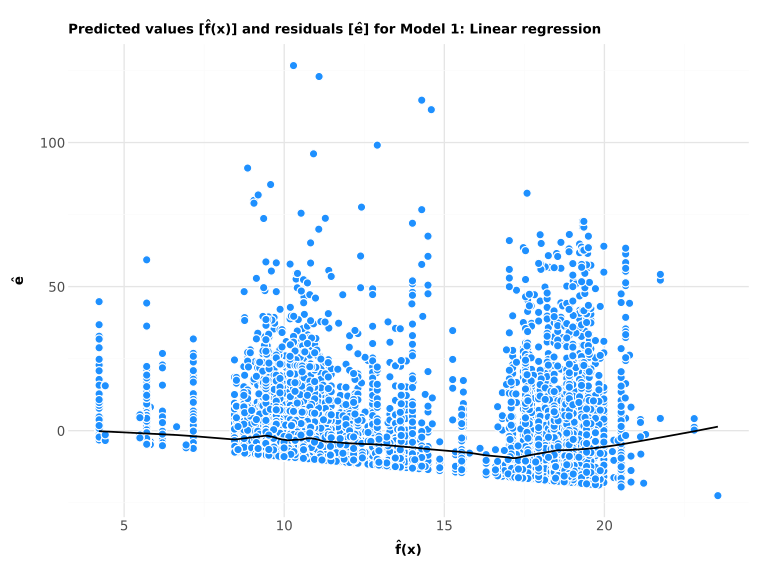
Moving onto the full model, we get rid of irrelevant variables and focus only on the ones of interest.
# Exclude irrelevant variables from the full model

features_to_exclude =  [
    "person",
    "rank",
    "podium",
    "year",
    "sex_or_gender",
    "season",
    "category",
    "country",
    "country_position",
    "capital",
    "sport",
    "person_id",
    "event_id",
    "host_country",
    "host_country_position"
]

features_to_include = [
    column
    for column in df.columns.tolist()
    if column not in features_to_exclude
]

X = df.loc[:, features_to_include]
mlr_2 = LinearRegression().fit(X,Y)

model = pd.DataFrame({
    "Term": ["Intercept"] + features_to_include,
    "Estimate": [mlr_2.intercept_.tolist()] + mlr_2.coef_.tolist()
}).round(4)

print(model)
Term Estimate
0 Intercept 8.825
1 age 0.000
.. ... ...
220 Gender: male -0.000
221 Gender: non-bi... 0.000
[222 rows x 2 columns]RMSE = 13.88 (112.27%)\(\displaystyle R^2 = 0.084\)
Tree-based regression
# Fit and plot a classification tree
# Initialize classification tree estimator
reg_tree = DecisionTreeRegressor(max_depth = 3)

# Fit the classification tree in the training data
est_reg_tree = reg_tree.fit(X_train, Y_train)

# Create a plot of the classification tree
plot_reg_tree, axis = plt.subplots(figsize = (10, 6))
plot_tree(
    decision_tree = est_reg_tree,
    feature_names = X_train.columns.tolist(),
    label = "root",
    impurity = False,
    precision = 2,
    ax = axis,
    fontsize = 10
)
plt.close()
plot_reg_tree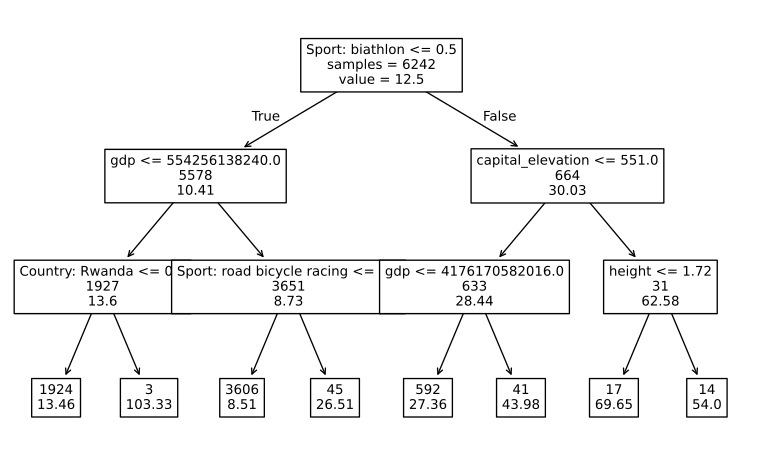
# Create a list of values of alpha
alphas = list(np.geomspace(0.01, 10, 100))

# Initialize 5-fold CV
CV_prune_reg_tree = GridSearchCV(
    estimator = DecisionTreeRegressor(),
    param_grid = {"ccp_alpha": alphas},
    scoring = "neg_root_mean_squared_error"
)
est_CV_prune_reg_tree = CV_prune_reg_tree.fit(X_train, Y_train)
# Extract optimal hyperparameter value
best_alpha = est_CV_prune_reg_tree.best_params_["ccp_alpha"]
# Assign CV estimate of RMSE to new variable
RMSE_CV_prune_reg_tree = round(
est_CV_prune_reg_tree.best_score_ * (-1),
3,
)
# Compute percentage deviation from observed target
DEV_CV_prune_reg_tree = round(
RMSE_CV_prune_reg_tree / Y_train.mean() * 100,
2,
)
# Print optimal hyperparameter value, runtime, and CV estimate of RMSE
print(f"Optimal alpha = {round(best_alpha, 3)}")
print(f"CV RMSE = {RMSE_CV_prune_reg_tree} ({DEV_CV_prune_reg_tree}%)")Optimal alpha = 0.433
CV RMSE = 12.532 (100.25%)# Initialize regression tree estimator
prune_reg_tree = DecisionTreeRegressor(ccp_alpha = best_alpha)
# Fit the regression tree in the training data with optimal alpha
est_prune_reg_tree = prune_reg_tree.fit(X_train, Y_train)
# Create a plot of the regression tree
plot_prune_reg_tree, axis = plt.subplots(figsize = (30,30))
plot_tree(
decision_tree = est_prune_reg_tree,
feature_names = X_train.columns.tolist(),
label = "root",
impurity = False,
precision = 2,
ax = axis,
fontsize = 10
)
plt.close()
# Output the regression tree plot
plot_prune_reg_tree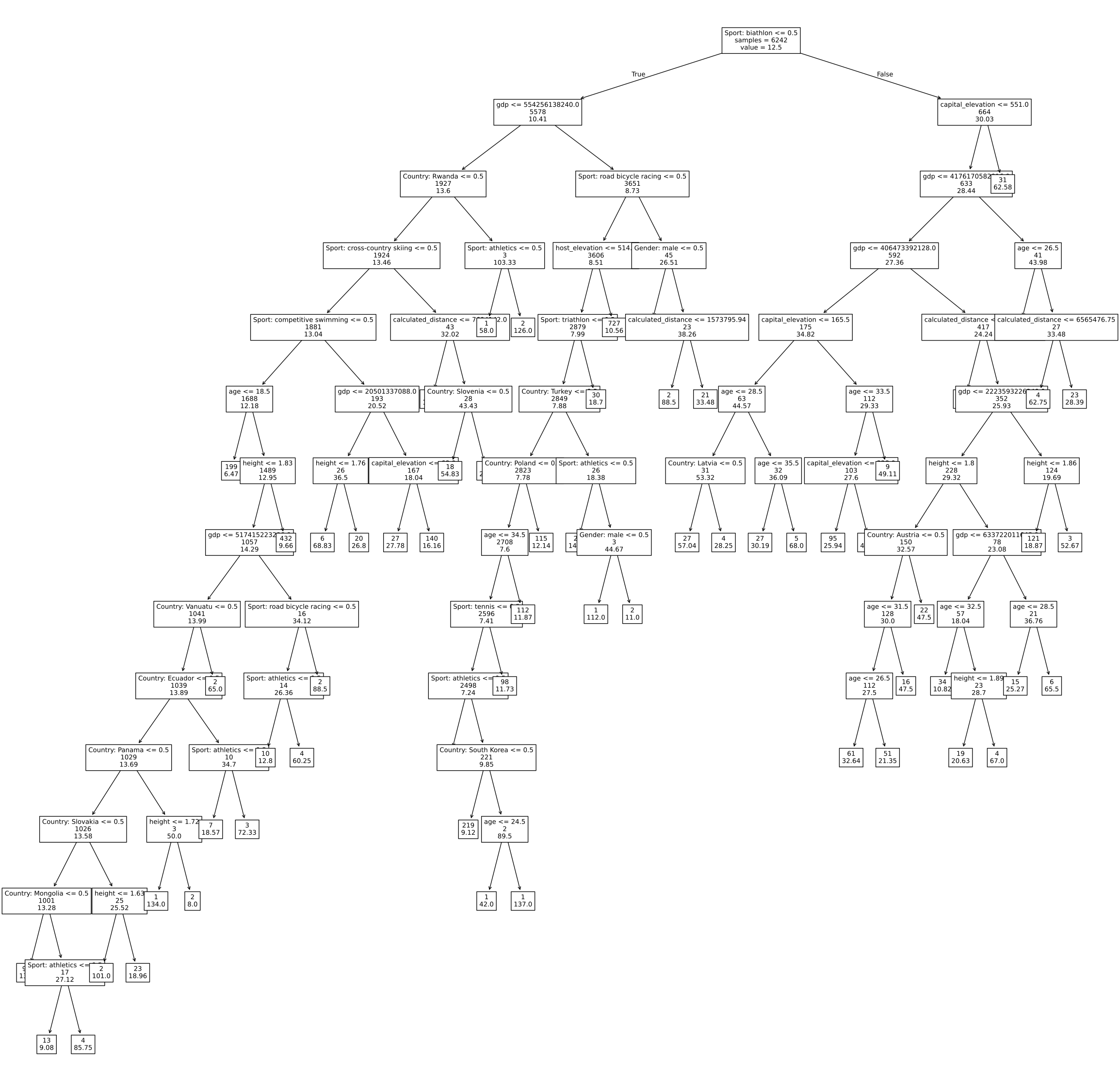
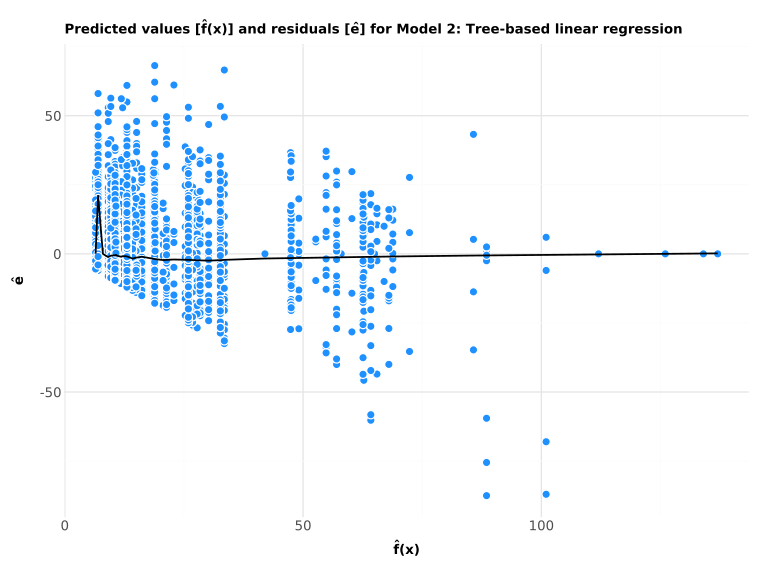
RMSE = 10.75 (86.91%)\(\displaystyle R^2 = 0.453\)
Comparison of regression models
As we can see, both models are quite unreliable, yielding high RMSE, as well as low \(R^2\) values, which indicates that they are not a good fit. However, the tree-based model shows a considerably better result than the simple model, with \(R^2\) values many times higher. In any way, simplifying the model into a classification problem might help to make it more reliable.
Linear classification
Test: Classification only of capital_elevation
# Construct a DataFrame containing the data to be plotted
df_density_plot = df.melt(
    id_vars = "podium",
    value_vars = [
        "capital_elevation"
    ],
    var_name = "feature",
    value_name = "value"
)

# Encode the target for plotting
encode_target = lambda x: (
    "Not on the podium"
    if x == "Not on podium"
    else "On the Podium"
)
df_density_plot["podium"] = (
    df_density_plot.loc[:, "podium"]
    .astype("string")
    .map(encode_target)
)
# Create the plot
# Title
title = "Distribution of Quantitative Features Across Values of Podium"
density_plot = (
# Specify data and aesthetics
ggplot(
data = df_density_plot,
mapping = aes(x = "value", fill = "podium")
) +
# Select the geom for points
geom_density(alpha = 0.75) +
# Use facet_wrap() to create multiples
facet_wrap(
facets = "feature",
nrow = 4,
ncol = 1,
scales = "free"
) +
# Control colors used to represent target values
scale_fill_manual(
values = {
"Not on the podium": "dodgerblue",
"On the Podium": "firebrick"
}
) +
# Set axis labels and title
labs(x = "", y = "Density", fill = "", title = title) +
# Use the global theme
global_theme +
# Make the plot larger
# and control appearance of control titles of small multiples
theme(
figure_size = (8, 10),
strip_text = element_text(face = "bold", size = 10, ha = "left")
)
)
# Output the plot
density_plot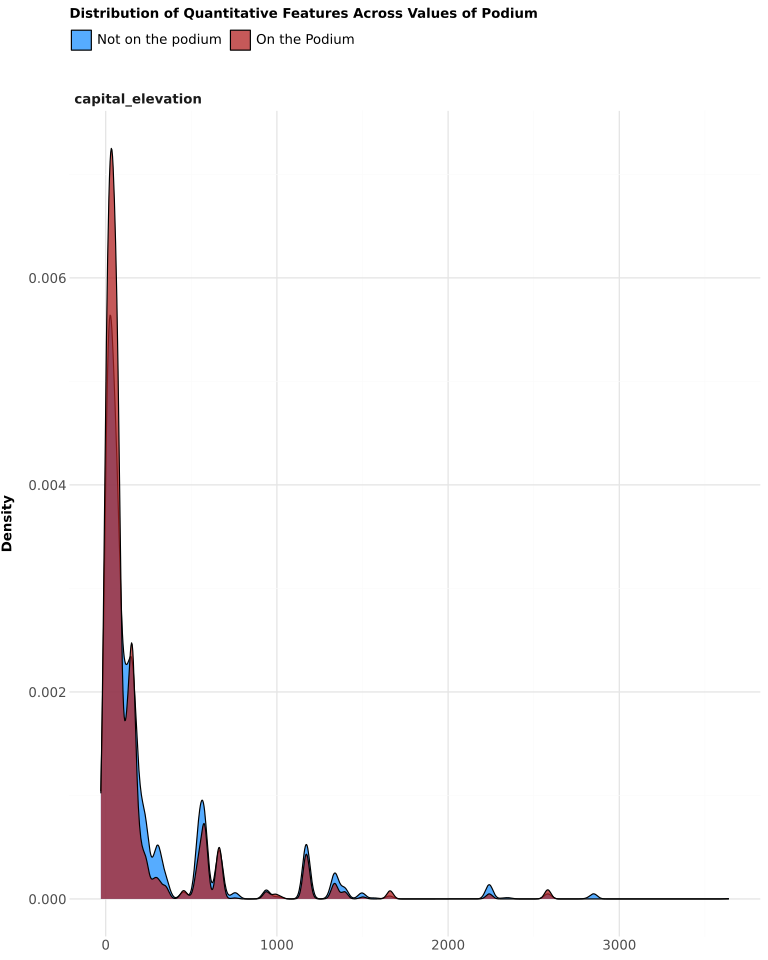
Logistic classification
# Fit a multiple linear regression model and output the coefficients
df["target"] = (df["podium"] == "On podium").astype(int)

Y = df.loc[:, "target"]

# Fit a simple logistic regression model
logit_1 = LogisticRegression(penalty = None, max_iter = 500).fit(X, Y)

# Put the coefficients in a DataFrame and output it

print(pd.DataFrame(
    {
    "Term": ["Intercept"] + features_to_include,
    "Estimate": logit_1.intercept_.tolist() + logit_1.coef_[0].tolist()
    }
).round(4))
Term Estimate
0 Intercept -0.000
1 age -0.000
.. ... ...
220 Gender: male -0.000
221 Gender: non-bi... 0.000
[222 rows x 2 columns]# Compute goodness of fit metrics and output them
# Define a function to plot the ROC curve
def plot_roc_curve(model, model_name, X, Y, AUC):
# Use a scikit_learn function to compute the ROC curve
roc = roc_curve(Y, model.predict_proba(X)[:, 1])
# Put the false and true positive rates in a DataFrame for plotting
tpr_fpr = pd.DataFrame({"FPR": roc[0], "TPR": roc[1]})
# Create the plot
return (
# Specify data and aesthetics
ggplot(
data = tpr_fpr,
mapping = aes(x = "FPR", y = "TPR")
) +
# Use the geom for lines
geom_line(color = "dodgerblue") +
# Draw a 45-degree line through the origin
geom_abline(
intercept = 0,
slope = 1,
color = "firebrick",
linetype = "dashed"
) +
# Display the AUC on the plot
annotate(
"text",
label = "AUC = " + str(round(AUC, 3)),
x = 0.875,
y = 0.1,
fontweight = "bold",
size = 10
) +
# Control axis labels and title
labs(
x = "False positive rate",
y = "True positive rate",
title = "ROC Curve for " + model_name
) +
#Use the global theme
global_theme
)
# Define a function to construct a confusion matrix
def confusion_matrix(Y, Y_hat):
# Construct a confusion matrix
CM = pd.crosstab(
index = Y,
columns = Y_hat,
rownames = ["Observed values"],
colnames = ["Predicted values"]
)
# Add a column of zeros if predictions are all zeroes
if CM.shape[1] == 1:
CM[1.0] = 0
return CM
# Define a function to compute GOF metrics for classification models
def classification_gof(model, X, Y, model_name = ""):
# Estimate response probabilities
p_hat = model.predict_proba(X)[:, 1]
# Predict classes
Y_hat = model.predict(X)
# Compute the error rate
err_bool = Y != Y_hat
err = pd.Series(err_bool).mean()
# Construct a confusion matrix
CM = confusion_matrix(Y, Y_hat)
# Compute precision, recall, and f1
P = CM.iloc[1, 1] / (CM.iloc[1, 1] + CM.iloc[0, 1])
R = CM.iloc[1, 1] / (CM.iloc[1, 1] + CM.iloc[1, 0])
F1 = 2 * P * R / (P + R)
# Compute the AUC
AUC = roc_auc_score(Y, model.predict_proba(X)[:, 1])
# Create a ROC curve plot
ROC = plot_roc_curve(model, model_name, X, Y, AUC)
return (
p_hat,
round(err, 3),
CM,
round(P, 3),
round(R, 3),
round(F1, 3),
ROC,
round(AUC, 3),
)
# Compute and print GOF metrics
model_name = "Model 3: Logistic Regression"
p_hat, err, CM, P, R, F1, ROC, AUC = classification_gof(
logit_1,
X,
Y,
model_name = model_name,
)
print(f"Error rate = {err}")
print(f"Precision = {P}")
print(f"Recall = {R}")
print(f"F1 = {F1}")
# Output the confusion matrix
print(CM)Error rate = 0.299
Precision = 0.402
Recall = 0.16
F1 = 0.228
Predicted values 0 1
Observed values
0 5127 513
1 1818 345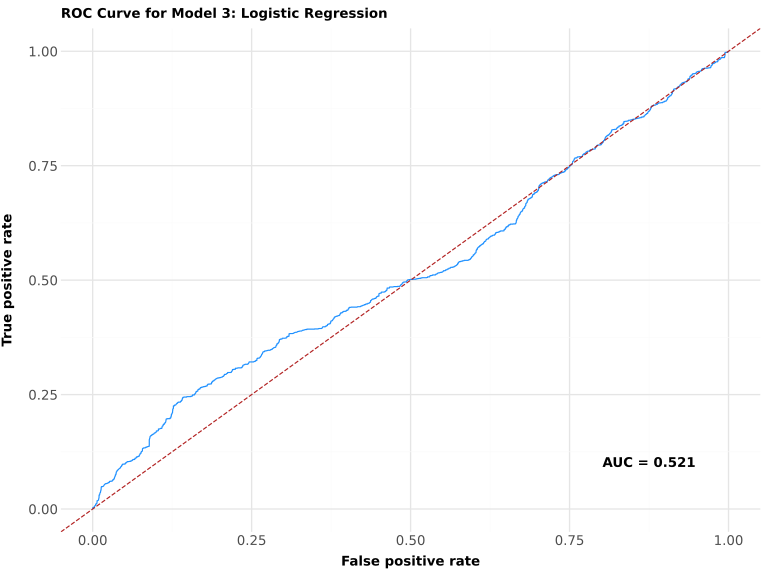
# Create a separation plot
# Define a function to reuse the code later

encode_target = lambda x: (
    "Not on the podium" if x == "0" else "On the podium"
)

def separation_plot(Y, p_hat):

    # Start by constructing a DataFrame
    # with predicted and observed values of the target
    df_separation_plot = pd.DataFrame(
        {
            "Y": Y.astype("string").map(encode_target),
            "p_hat": p_hat
        }
    )

    # Order the DataFrame by predicted values
    # and construct an index variable
    df_separation_plot.sort_values(by = "p_hat", inplace = True)
    df_separation_plot.reset_index(drop = True, inplace = True)
    df_separation_plot["idx"] = df_separation_plot.index

    # Create the plot
    return (
        # Specify data and aesthetics
        ggplot(
        data = df_separation_plot,
        mapping = aes(x = "idx", color = "Y")
        ) +

        # Use the geom for line segments
        geom_segment(mapping = aes(xend = "idx", y = 0, yend = 1)) +

        # Use the geom for lines
        geom_line(
            mapping = aes(y = "p_hat"),
            color = "black"
        ) +

        # Control colors used to represent observed values
        scale_color_manual(
            values = {
                "On the podium": "firebrick",
                "Not on the podium": "dodgerblue"
            }
        ) +

        # Control axis labels and title
        labs(
            x = "$\mathbf{i}$",
            y = "$\mathbf{\hat{p}(x_i)}$",
            color = "Observed Values",
            title = "Separation plot for " + model_name
        ) +

        # Use the global theme
        global_theme +

        # Adjust plot margins
        theme(plot_margin = 0.025)
    )

# Output the separation plot
separation_plot(Y, p_hat)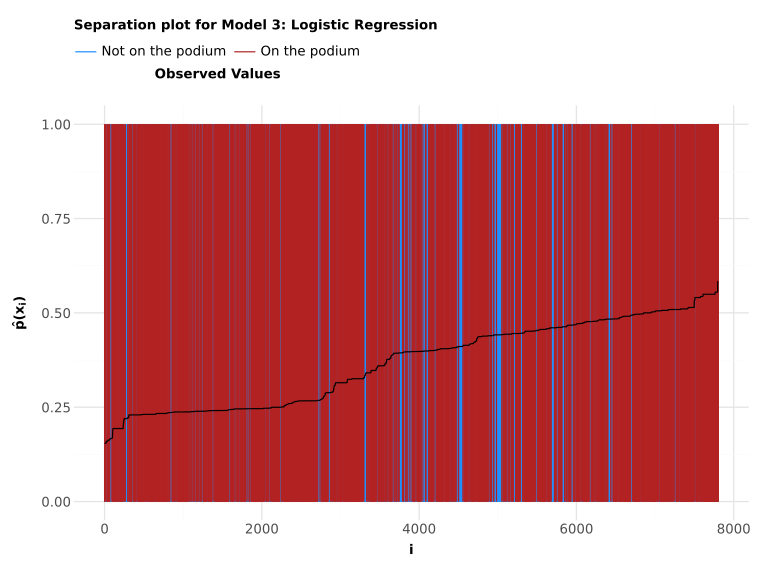
With the logistic regression model always predicting that the athlete is not on the podium, it seems it’s worse than either one of the linear regression models.
Tree-based classification
# Fit and plot a classification tree
# Initialize classification tree estimator
class_tree = DecisionTreeClassifier(max_depth = 3)

# Fit the classification tree in the training data with optimal alpha
est_class_tree = class_tree.fit(X_train, Y_train)

# Create a plot of the classification tree
plot_class_tree, axis = plt.subplots(figsize = (10, 6))
plot_tree(
    decision_tree = est_class_tree,
    feature_names = X_train.columns.tolist(),
    label = "root",
    impurity = False,
    precision = 2,
    ax = axis,
    fontsize = 10
)
plt.close()
plot_class_tree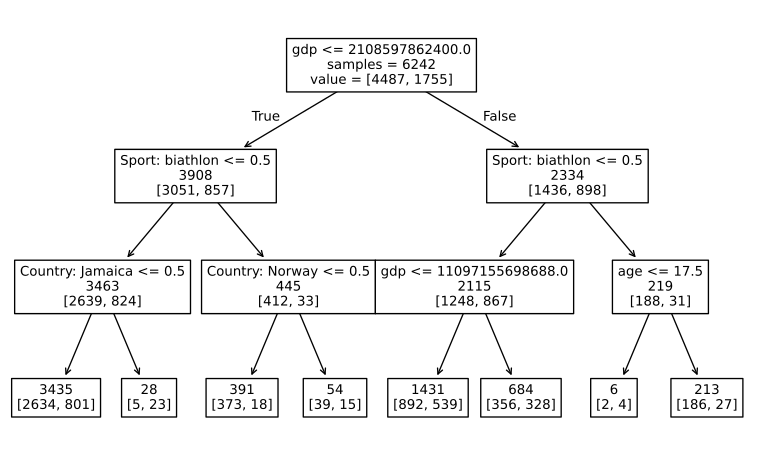
# Use 5-fold CV to tune a classification tree
# Create a list of values of alpha
alphas = list(np.geomspace(0.0005, 10, 100))

# Initialize 5-fold CV
CV_prune_class_tree = GridSearchCV(
    estimator = DecisionTreeClassifier(),
    param_grid = {"ccp_alpha": alphas},
    scoring = "f1"
)

# Implement the 5-fold CV procedure
est_CV_prune_class_tree = CV_prune_class_tree.fit(X_train, Y_train)
# Print the results of the CV procedure
# Extract optimal hyperparameter value
best_alpha = est_CV_prune_class_tree.best_params_["ccp_alpha"]
# Assign CV estimate of f1 to new variable
F1_CV_prune_class_tree = round(est_CV_prune_class_tree.best_score_, 3)
# Print optimal hyperparameter value, runtime,
# and the CV estimate of the RMSE
print(f"Optimal alpha = {round(best_alpha, 3)}")
print(f"CV F1 = {F1_CV_prune_class_tree}")Optimal alpha = 0.0
CV F1 = 0.479# Fit and plot a classification tree
# Initialize classification tree estimator
class_tree = DecisionTreeClassifier(ccp_alpha = best_alpha)
# Fit the classification tree in the training data with optimal alpha
est_class_tree = class_tree.fit(X_train, Y_train)
# Create a plot of the classification tree
plot_class_tree, axis = plt.subplots(figsize = (30, 20))
plot_tree(
decision_tree = est_class_tree,
feature_names = X_train.columns.tolist(),
label = "root",
impurity = False,
precision = 2,
ax = axis,
fontsize = 10
)
plt.close()
plot_class_tree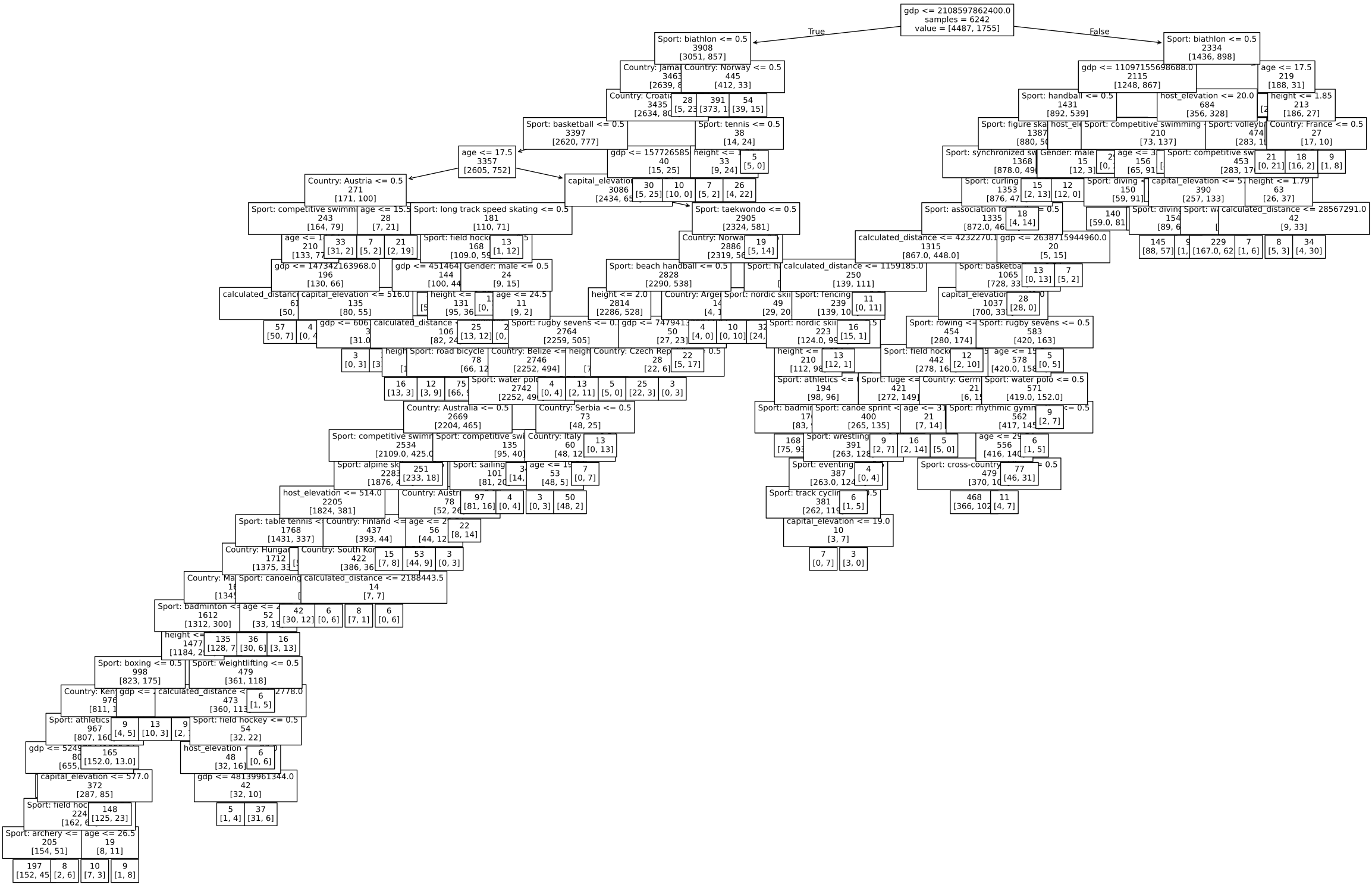
# Predict the target in the set and evaluate performance
# Compute predicted values in the test set
Y_hat = est_class_tree.predict(X_test)

# Estimate response probabilities
p_hat = est_class_tree.predict_proba(X_test)[:, 1]

# Compute the error rate
err_bool = Y_test != Y_hat
err = pd.Series(err_bool).mean()

# Construct a confusion matrix
CM = pd.crosstab(
    index = Y_test,
    columns = Y_hat,
    rownames = ["Observed values"],
    colnames = ["Predicted values"]
)

# Compute precision, recall, and f1
P = CM.iloc[1, 1] / (CM.iloc[1, 1] + CM.iloc[0, 1])
R = CM.iloc[1, 1] / (CM.iloc[1, 1] + CM.iloc[1, 0])
F1 = 2 * P * R / (P + R)

# Compute the AUC
AUC = roc_auc_score(Y_test, p_hat)
# Create a separation plot
# Start by constructing a DataFrame
# with predicted and observed values of the target
df_separation_plot = pd.DataFrame(
{
"Y": (
Y_test.astype("string")
.map(lambda x: (
"Not on the podium"
if x == "0"
else "On the podium")
)
),
"p_hat": p_hat
}
)
# Order the DataFrame by predicted values
# and construct an index variable
df_separation_plot.sort_values(by = "p_hat", inplace = True)
df_separation_plot.reset_index(drop = True, inplace = True)
df_separation_plot["idx"] = df_separation_plot.index
# Specify plot subtitle
alpha = est_CV_prune_class_tree.best_params_["ccp_alpha"]
subtitle = [
"Optimal alpha = " + str(alpha),
"Err = " + str(round(err * 100, 1)) + "%",
"F1 = " + str(round(F1, 3))
]
subtitle = ", ".join(subtitle)
# Create the plot
separation_plot = (
# Specify data and aesthetics
ggplot(
data = df_separation_plot,
mapping = aes(x = "idx", color = "Y")
) +
# Use the geom for line segments
geom_segment(
mapping = aes(xend = "idx", y = 0, yend = 1),
size = 1
) +
# Use the geom for lines
geom_line(
mapping = aes(y = "p_hat"),
color = "black"
) +
# Control colors used to represent observed values
scale_color_manual(
values = {
"On the podium": "firebrick",
"Not on the podium": "dodgerblue"
}
) +
# Control axis labels and title
labs(
x = "$\mathbf{i}$",
y = "$\mathbf{\hat{p}(x_i)}$",
color = "Observed Values",
title = "Boosting Test Set Performance for Predicting Podium",
subtitle = subtitle
) +
# Use the global theme
global_theme +
# Adjust plot margins
theme(plot_margin = 0.025)
)
Predicted values     0    1
Observed values
0                 1045  108
1                  262  146
# Create a ROC curve
# Use a scikit_learn function to compute the ROC curve
title = "Test Set ROC Curve for Model 4: Tree-based logistic regression"
roc = roc_curve(Y_test, p_hat)
# Put the false and true positive rates in a DataFrame for plotting
tpr_fpr = pd.DataFrame({"FPR": roc[0], "TPR": roc[1]})
# Create the plot
roc_curve = (
# Specify data and aesthetics
ggplot(
data = tpr_fpr,
mapping = aes(x = "FPR", y = "TPR")
) +
# Use the geom for lines
geom_line(color = "dodgerblue") +
# Draw a 45-degree line through the origin
geom_abline(
intercept = 0,
slope = 1,
color = "firebrick",
linetype = "dashed"
) +
# Display the AUC on the plot
annotate(
"text",
label = "AUC = " + str(round(AUC, 3)),
x = 0.875,
y = 0.1,
fontweight = "bold",
size = 10
) +
# Control axis labels and title
labs(
x = "False positive rate",
y = "True positive rate",
title = title
) +
# Use the global theme
global_theme
)
# Output the ROC curve
roc_curve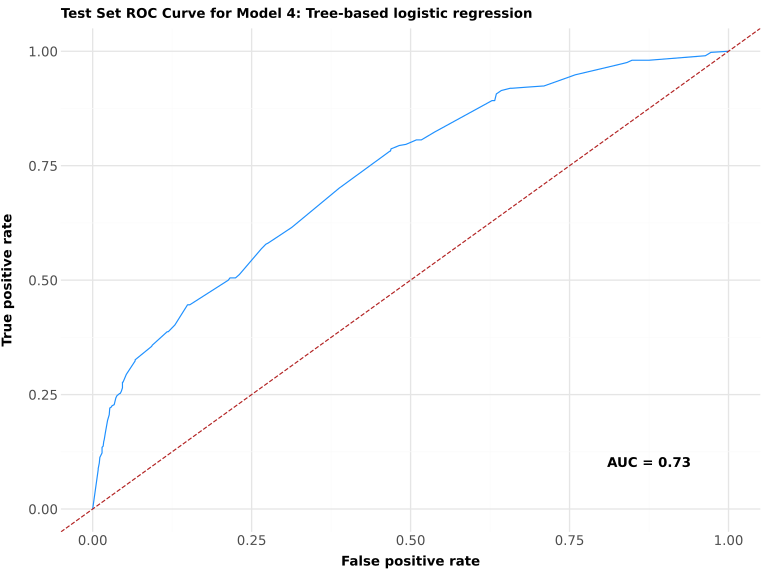
Comparison of classification models
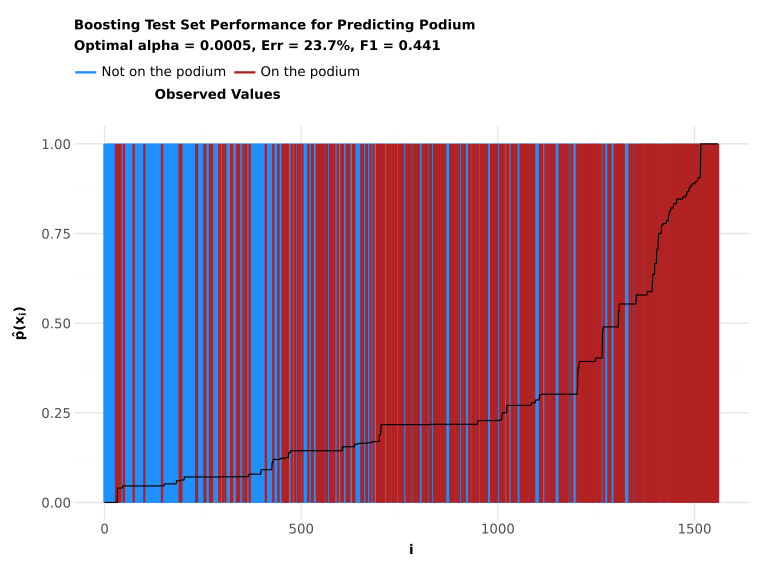
As we can see, the fourth model yields much better results than the previous ones, providing a somewhat reliable prediction of whether a given athlete will place on the podium.
Conclusion
In this project we tried to see if it was possible to predict athletic performance by using machine learning models and data from Wikidata. We looked at different features like GDP, height, elevation, distance between countries, age and different sports to see if they had some effect on athletic success.
The results showed that the linear regression models were not very good for predicting athletic performance. The R² values were very low, which means that the variables only explained a very small amount of the athlete rankings. This may show that athletic performance is much more complicated and not just based on simple linear relationships.
The tree-based regression model worked better than the linear regression model. The decision tree models could show more complicated patterns in the dataset, and variables like GDP, height, mass and elevation appeared many times in the important splits of the trees. This could maybe mean that these variables have some importance for athletic succes, but they still cannot explain everything alone.
The logistic regression model also did not perform very strongly. The ROC-AUC score was close to 0.5, which means the model was only a little better than random guessing. The confusion matrix and F1 score also showed that it was difficult for the model to predict correctly which athletes would end on the podium. Finally, the tree-based classification model yielded more reliable results, with the ROC-AUC score closer to 0.7–0.8, which might indicate that it was a suitable way of predicting the results.
Another important part of the project was the data cleaning. There were many missing values and some inconsistent units in the dataset, especially for height and mass. Because of this, several cleaning and preprocessing steps had to be done before the models could be trained properly.
Overall, the project showed that machine learning can help find patterns in athletic data, but also that athletic success is very difficult to predict completely. There are many different factors that can affect athletic performance, and not all of them were included in the dataset.